Proxy Website

Enjoy unrestricted and uncensored browsing with our service. You make a request via our site, we fetch the resource and send it back to you.
Browsing through us both keeps you anonymous from the sites you visit and allows you to bypass any network restrictions from your government, workplace or college.
(:: click here ::)
Format Factory v3.0.1
Format Factory is a multifunctional media converter.
Provides functions below:
All to MP4/3GP/MPG/AVI/WMV/FLV/SWF.
All to MP3/WMA/AMR/OGG/AAC/WAV.
All to JPG/BMP/PNG/TIF/ICO/GIF/TGA.
Rip DVD to video file , Rip Music CD to audio file.
MP4 files support iPod/iPhone/PSP/BlackBerry format.
Supports RMVB,Watermark, AV Mux.

Format Factory's Feature:
1 support converting all popular video,audio,picture formats to others.
2 Repair damaged video and audio file.
3 Reducing Multimedia file size.
4 Support iphone,ipod multimedia file formats.
5 Picture converting supports Zoom,Rotate/Flip,tags.
6 DVD Ripper.
7 Supports 56 languages
OS requirements: All Windows OS
log on to http://www.formatoz.com for more information.


KMS Activator for Microsoft Office 2010
Microsoft Office 2010 gives you powerful new tools to express your ideas, solve problems, and connect with people. Office 2010 lets you work how, when, and where you want, letting you get things from a PC, the Web, and even a smartphone.
Use Office 2010 virtually anywhere: PC, phone, browser
With Microsoft Office 2010, you can review and do minor editing on Word, Excel, PowerPoint, and OneNote 2010 documents, virtually anywhere, by using Office Web Apps from more locations on more devices.
Keep your people productive on the go. Office 2010 lets you access and edit documents stored on a server while you’re offline with SharePoint Workspace 2010, and then automatically syncs these changes when you’re back online. So you stay productive while on the go.

Adding More Space To Partition C
Allocate more hard drive space to C drive without data loss
When c drive is running out of space, can we allocate more space to c drive without any damage the present c drive or other drives? Developed by Microsoft and was built in Windows“Disk Management” cannot adjust c drive without losing data. What shall we do when we want to add more space to the boot drive?
We did a test on Partition Wizard and it worked.
Step by Step Guide to allocate more space to c drive
If you need more space on C drive, then a third party program like Partition Wizard can help you resize c drive without data loss. Usually the programs are developed according to different Windows Operating Systems. Partition Wizard works on Windows OS including 2008, 2003 and all PCs(Windows 7, XP, Vista, 2000 Pro). Here is a step by step guide that we create by using this program.
* Firstly, download Partition.Wizard.Pro.5.2_2b plus key below.
* Run the pwpe52.exe to install. It won’t ask you to reboot the server after installation.
* After installation, run the icon Partition Wizard to start.
* When it runs, you can see the start up screen.
Now we want to shrink the data partition to be 100GB and make 33GB unallocated space. The unallocated space will be redistributed to the boot partition.
* Right click G drive to shrink the data partition to be 100GB. When you right clicking the G drive, it will show options including “Move/Resize”, which is what we need to shrink the data partition to make 33GB unallocated space.
And it will pop up a box where you can drag the partition edge to make unallocated space.
Then right click partition F and reach the option “Move/Resize”, this time, we will move the whole partition to the right part of the unallocated space.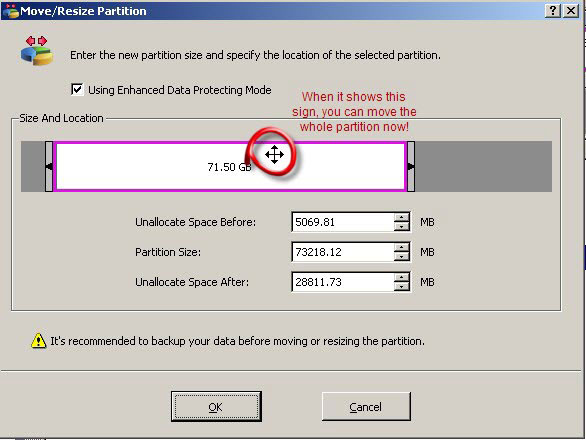
Then it is the same way to move partition E. And when the unallocated space is moved right to the c partition, then you can right click C to “Move/Resize” option to extend c drive with the unallocated space.
And after we claimed the unallocated space, you can see the present c drive is 43GB.
These are the steps to extend server c drive with Partition Wizard. Under the left part of the application, we can see the pending four operations listed.

Enabling Right Click on Sites that Disable it

Lots of web sites have disabled the right click function of the mouse button... it's really, really annoying. This is done so that you don't steal (via right-click->save picture) their photos or images or any other goodies. Unfortunately, it disables ALL right-click functionality: copy, paste, open in new window.
INTERNET EXPLORER
It's easy to change, assuming your using IE 6:
1. Click"Tools"->"Internet Options"
2. Click the "Security" tab
3. Click "Custom Level"
4. Scroll down to the "Scripting" section
5. Set "Active Scripting" to "disable"
6. Click "Ok" a couple of times.
You'll probably want to turn this back to "enable" when you'r done... 'cause generally the javascript enhances a website.
MOZILLA FIREFOX
1.Go to Tools> Options and select Web Options from the left panel.
2. You would see that Enable JavaScript is checked by default. Uncheck it and click OK.
3. Right Clicking should now be enabled on websites that do not allow it.
4. If this does not work, you could disable java altogether from the check box in the same window.
OPERA
1. Go to ->Tools>Preferences and select the "Advanced"Tab.
2. From the left panel, select "Content"
3. You would see that Enable JavaScript is checked by default. Uncheck it and click OK.
4. Right Clicking should now be enabled on websites that do not allow it.
5. If this does not work, you could disable java altogether


